Report · Projektportal · Webform-Paritaet · 2026-06-19
Projektportal Formular-Paritaet zur Webform-Referenz
Untersuchung der Projektportal-Formulare gegen kanonische Webform-Referenzen. Fokus: Ueberschriften, Formbreiten, Abschnittsabstaende, Grid-/Responsive-Verhalten, Buttons, Uploads und strukturelle Bindung an das Webform-Markup.
Benchmark
Webform-Basis:
form.css, webform_flexbox, Fieldset-/Section-Titel 32px,
Labels 15px, Inputs 19px, Submit-Pill 19px, Top-Level-Gap 72px.
Gut gebunden
Vacancy- und RSM-Bewerbungsformulare matchen den Webform-Contract weitgehend. Profil-Entity-Form spiegelt
mit
.profile-flexrow responsive Grid-Verhalten.
Drift-Risiko
Projekt-Alert und Suchagent sind Custom
FormBase-Formulare: gleiche Token, aber keine
webform_flexbox-Rows und abweichende Canvas-/Direct-Containerbreiten.
P0 Findings
Doppelte H1 in Projektbewerbung, Alert-Container 768px vs. Direct 900px, Konto ohne Webform-Sections,
Profil-Dateiupload als Entity-Tabelle statt Webform-Dropzone.
1. Kanonischer Formularstandard
Als harte Referenz gelten web/themes/custom/byte_theme/src/form.css und die aktiven Webform-Konfigurationen
in config/sync. Besonders stark ist webform.webform.beispiel.yml, weil es
webform-progress-bar, webform_section, webform_flexbox,
webform-togglebar und webform_document_file kombiniert. Fuer Apply-Formulare ist
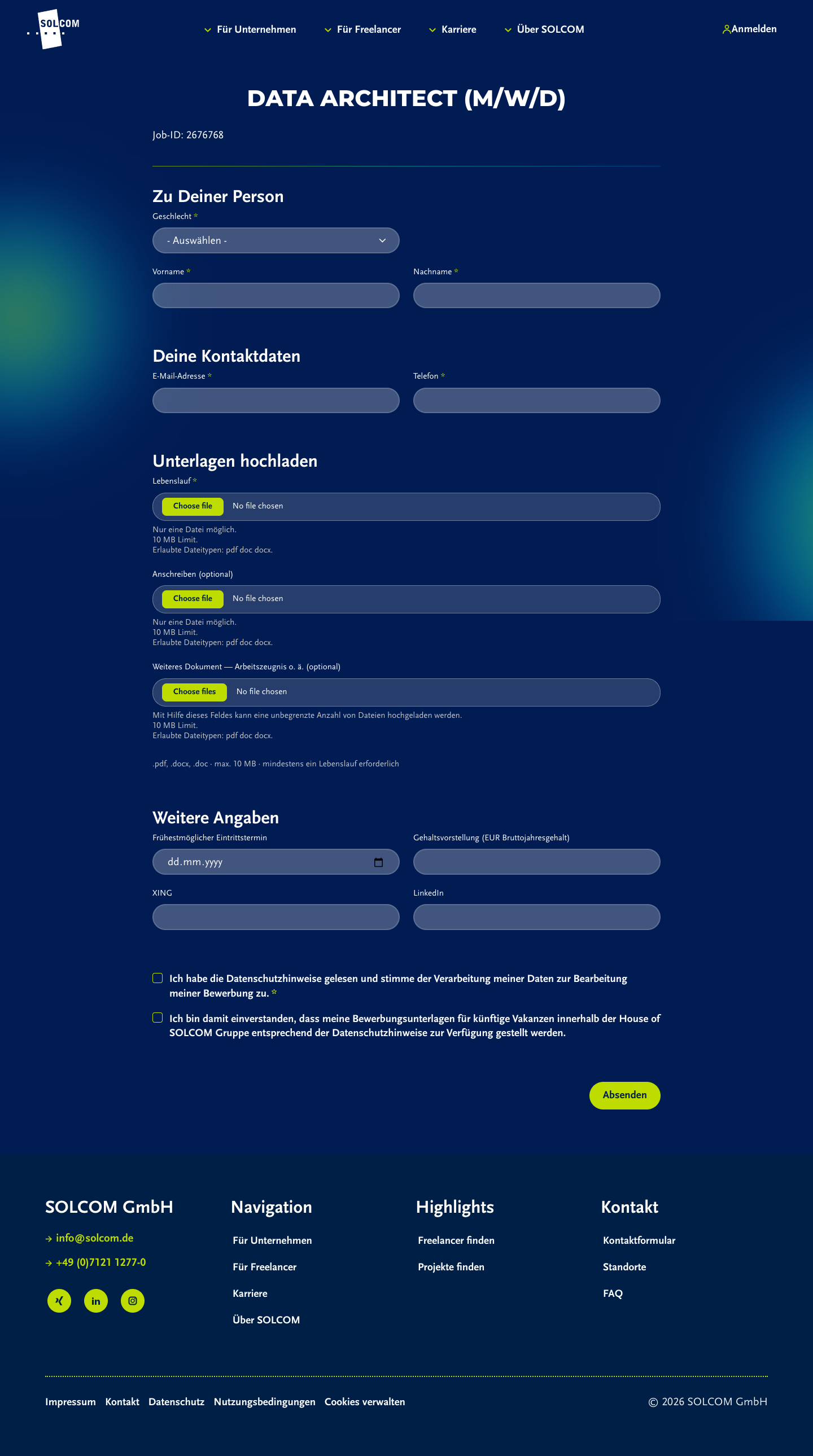
vacancy_application der realistischere Referenz-Contract: 900px Form-Container, Fieldsets,
webform_flexbox, Managed Files und Datenschutzzeile.
| Token / Struktur | Referenzwert im Browser | Quelle |
|---|---|---|
| Top-Level-Form-Gap | 72px | .webform-submission-form, .profile-form, .projektpartner-alert-form |
| Fieldset-/Section-Heading | 32px, bold, weiss | .webform-type-fieldset > legend .fieldset-legend, .webform-section-title |
| Label | 15px, 500, block, 8px Bottom-Margin | label, .fieldset-legend |
| Input | 19px, 24px Radius, Glass-Background, 45.64px Hoehe | input, select, textarea |
| Submit | 19px bold, 30px Radius, Lime-Background, 49.64px Hoehe | .form-submit, input.button |
| Desktop-Grid | webform_flexbox row, 24px Gap | .webform-flexbox |
| Mobile-Grid | webform_flexbox column, 20px Gap, kein Overflow | 390px Browsermessung |
2. Match-/Gap-Matrix
| Formular | Technik | Match | Gap / Risiko | Evidence |
|---|---|---|---|---|
| Webform Beispiel | Webform | Referenz Progress, Sections, Togglebar, Document Upload, Flexbox. | Kein Portal-Formular, aber beste Style-Referenz. | Desktop, Mobile |
| Vacancy-Bewerbung | Webform | Match 900px, 72px Gap, 32px Fieldsets, Flexbox row/column. | Karriere-Flow, aber als Apply-Webform sauberer Benchmark. | Desktop, Mobile |
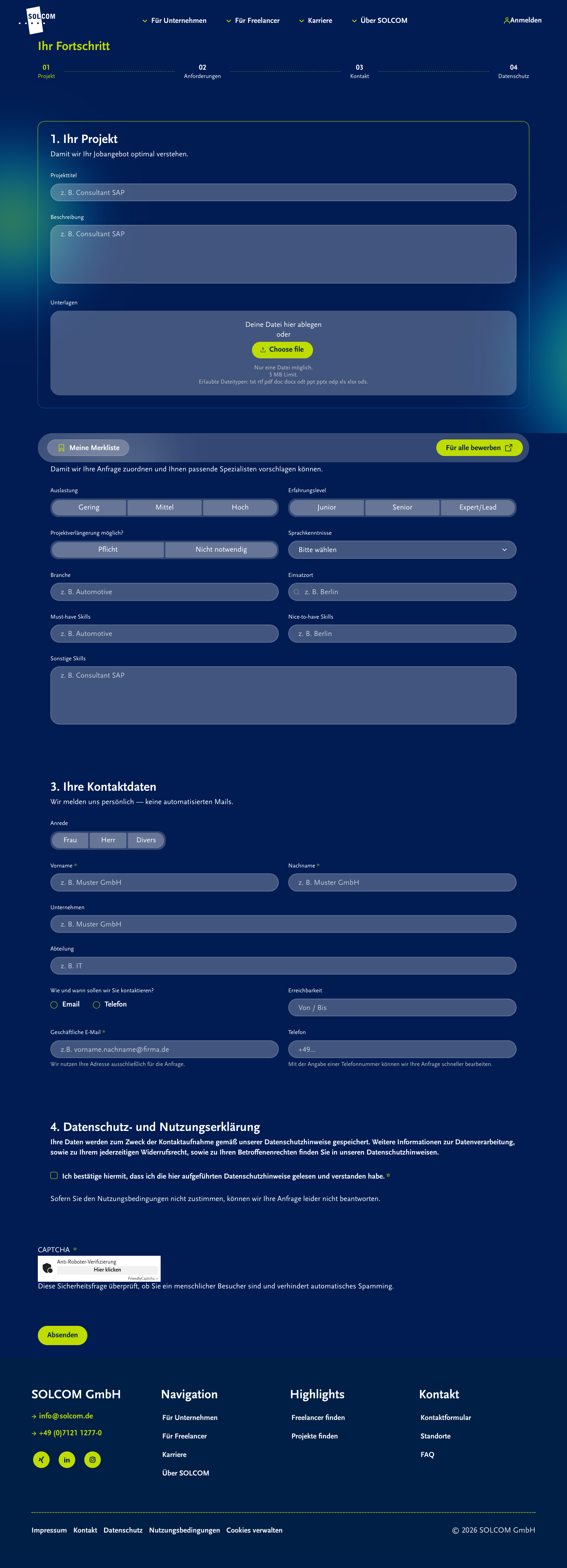
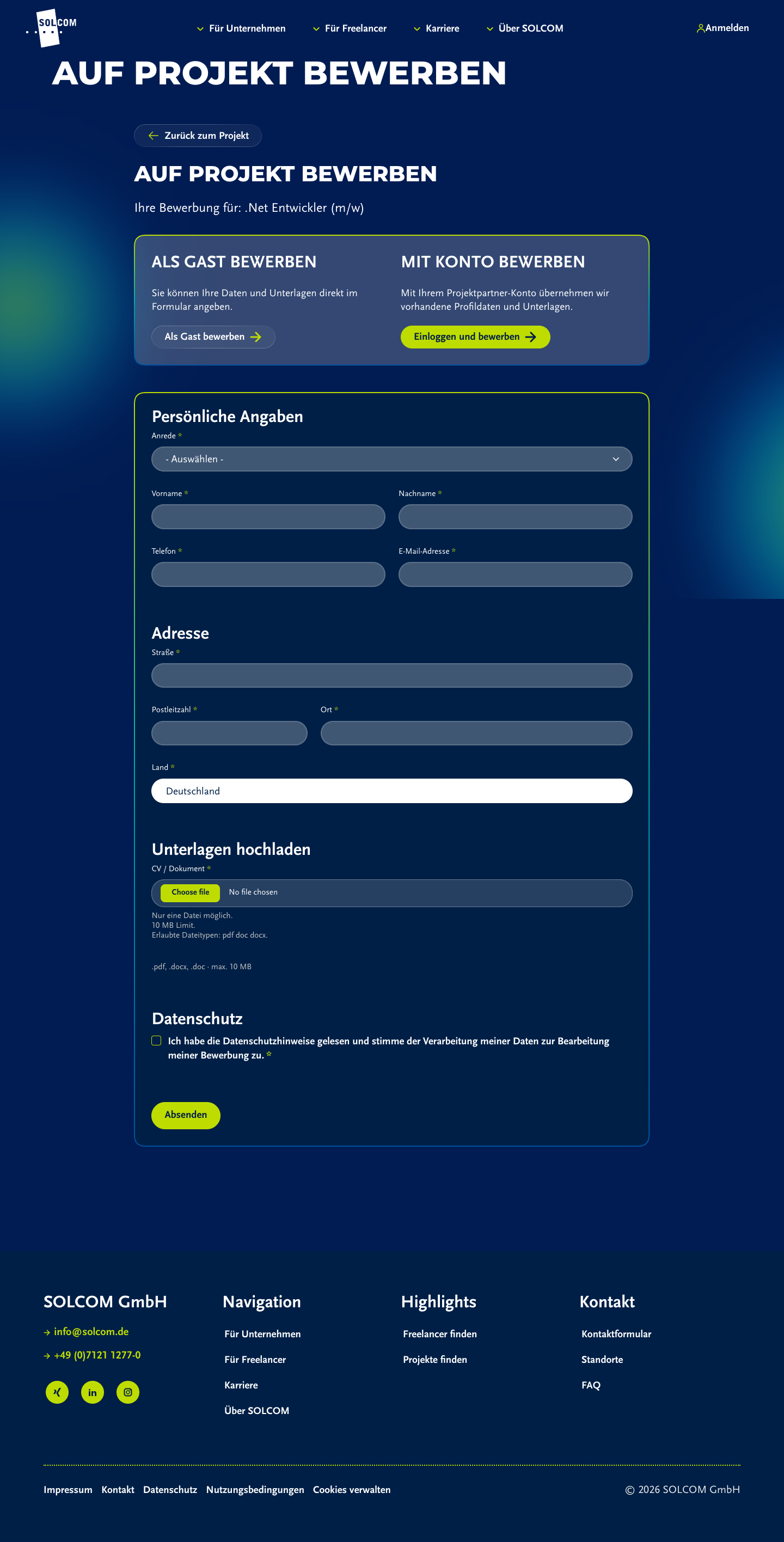
| Projektbewerbung | Webform in Custom Page/Card | Teilmatch 72px Gap, Fieldsets, Flexbox, Submit, Inputs matchen. | P0 Doppelte H1 Auf Projekt bewerben. Formbreite 883px durch Card-Padding statt 900px. |
Desktop, Mobile |
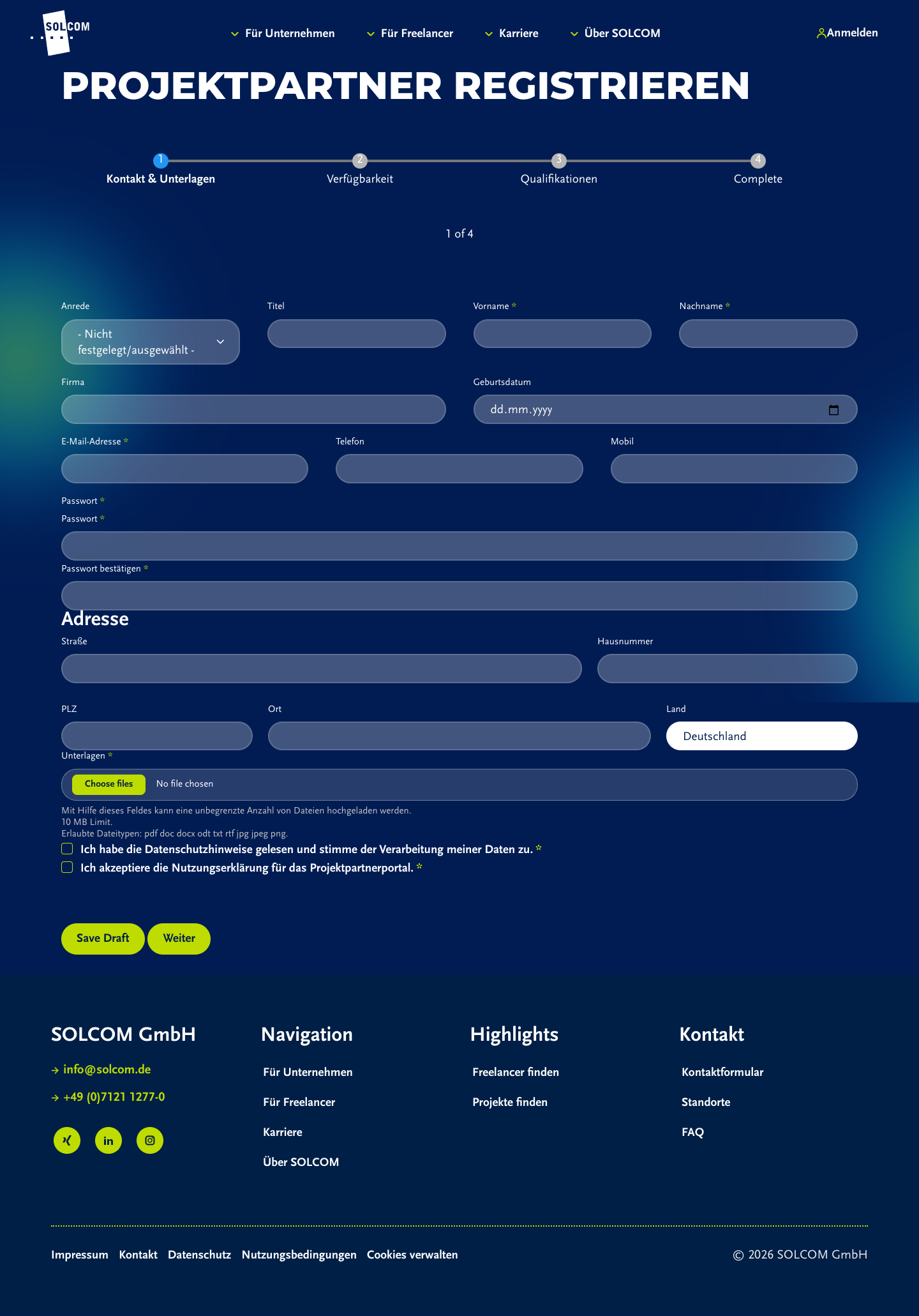
| Projektpartner-Registrierung | Webform Wizard | Teilmatch Webform, Wizard, Flexbox, Inputs, Labels. | P1 1248px Desktop-Form statt 900px Apply-Referenz; Save Draft sichtbar; Date-Feld rendert browser-nativ als Day/Month/Year. |
Desktop, Mobile |
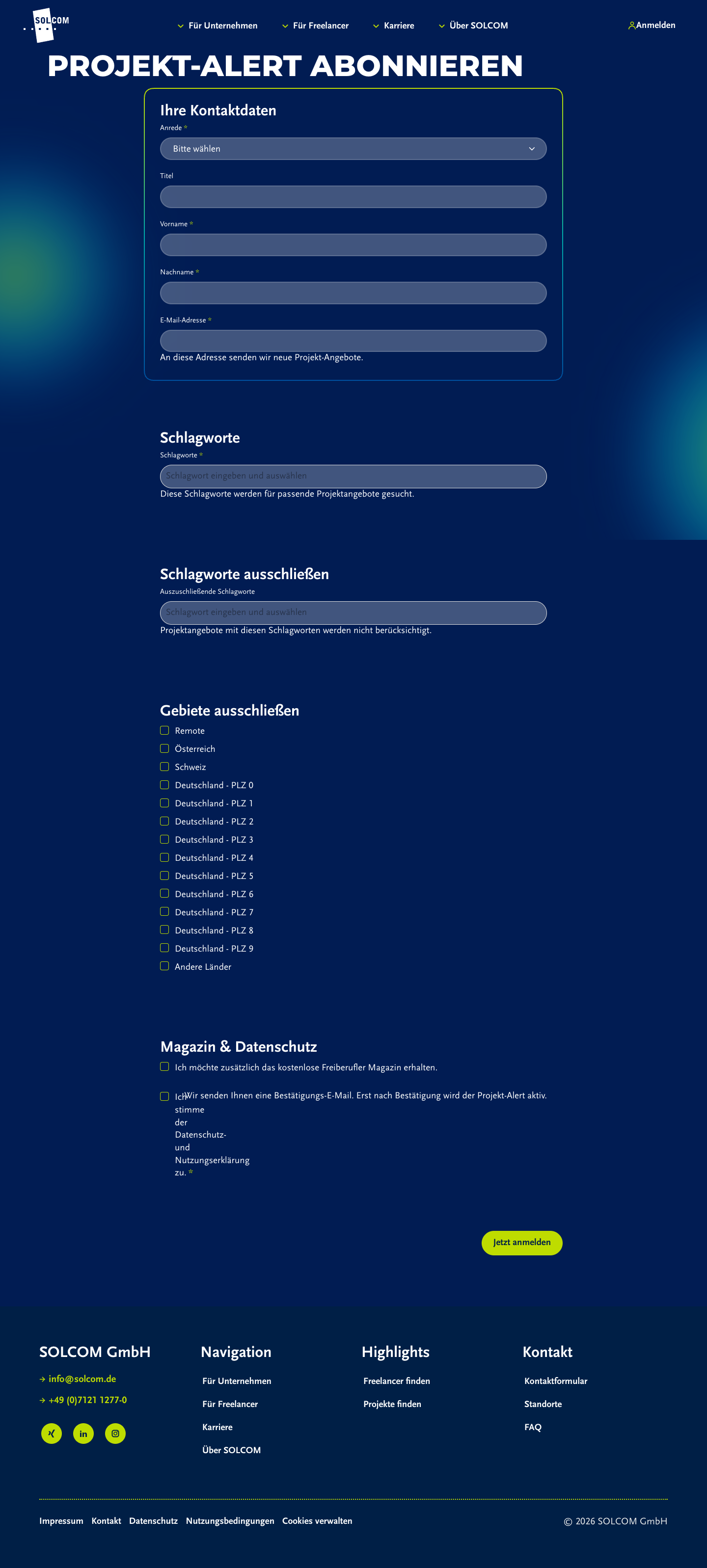
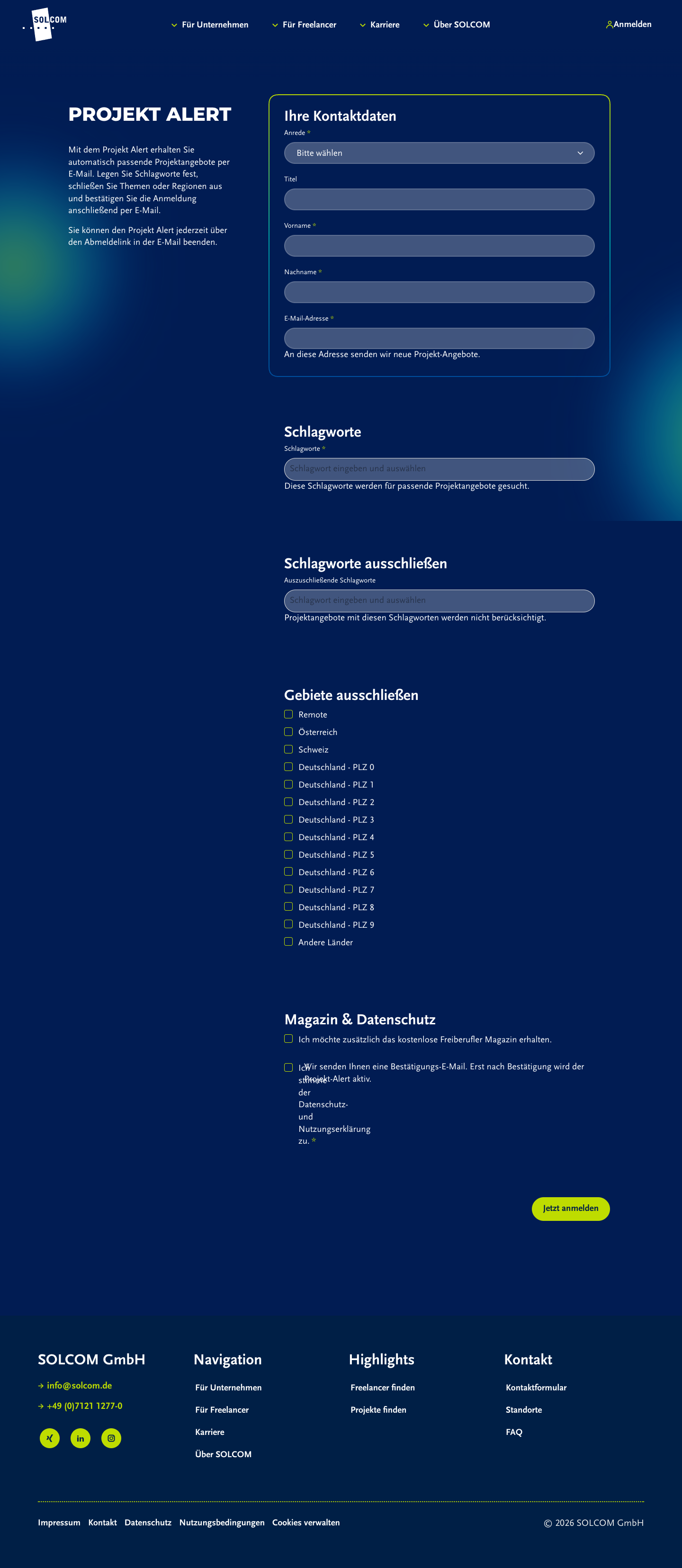
| Projekt-Alert Canvas | Custom FormBase in Canvas Block |
Teilmatch Form-Gap, Headings, Labels, Inputs, Buttons matchen Token. | P0 Keine webform_flexbox-Rows; Kontaktfelder bleiben Desktop einspaltig. Canvas-Container 768px, Direct Route 900px. |
Desktop, Mobile |
| Projekt-Alert Direct Route | Custom FormBase direkt |
Teilmatch 900px Breite, Token matchen. | P1 Andere H1 als Canvas: Projekt-Alert abonnieren vs. Projekt Alert. Gleicher Inhalt, andere Oberflaeche erreichbar. |
Desktop, Mobile |
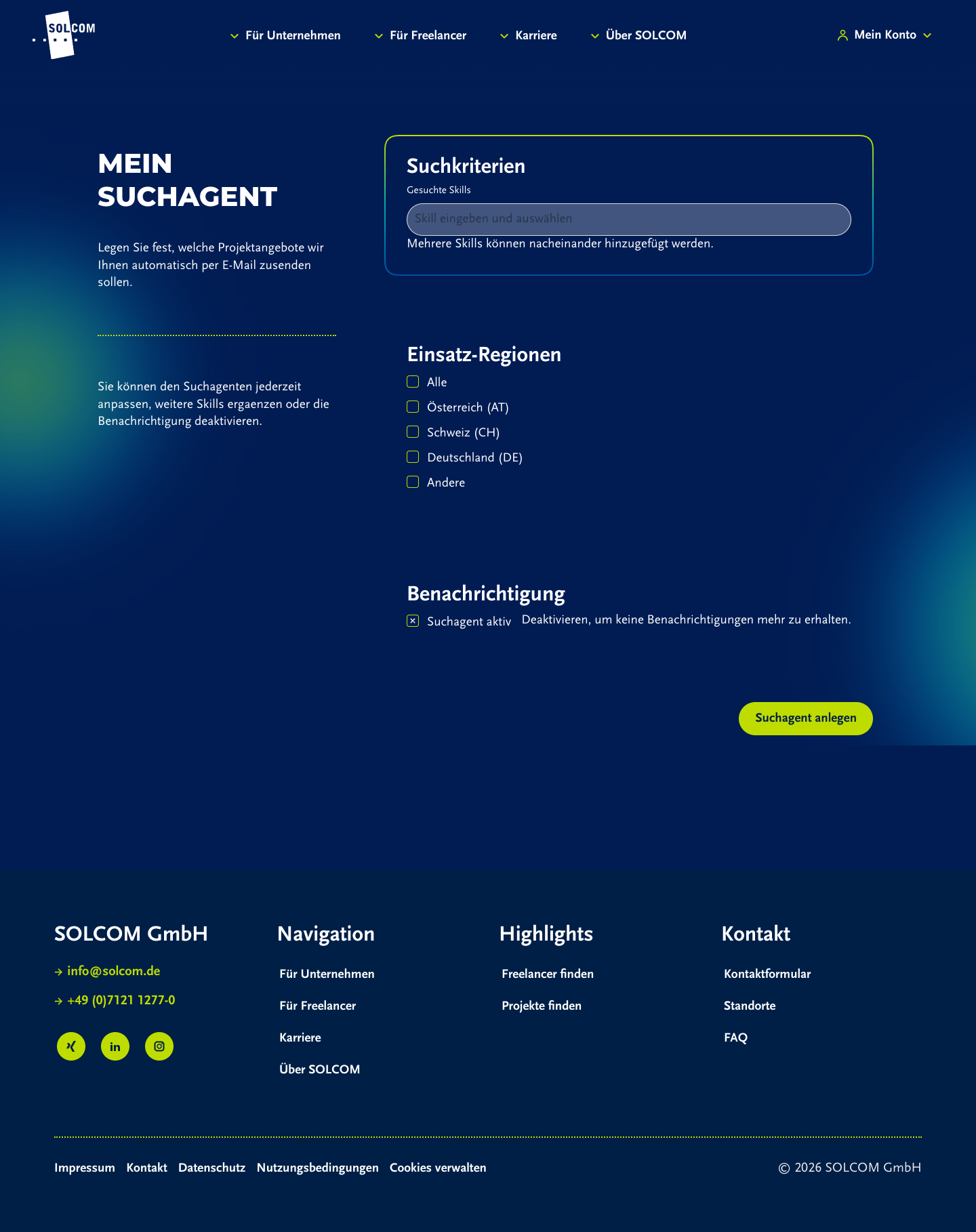
| Suchagent | Custom FormBase in Canvas Block |
Teilmatch Form-Gap, Fieldset-H3, Tagify-Skin, Checkbox-Skin, Submit matchen. | P0 Keine Webform-Flexbox-Struktur; Formbreite 768px Desktop, 342px Mobile; nur Token-Paritaet, keine Markup-Paritaet. | Desktop, Mobile |
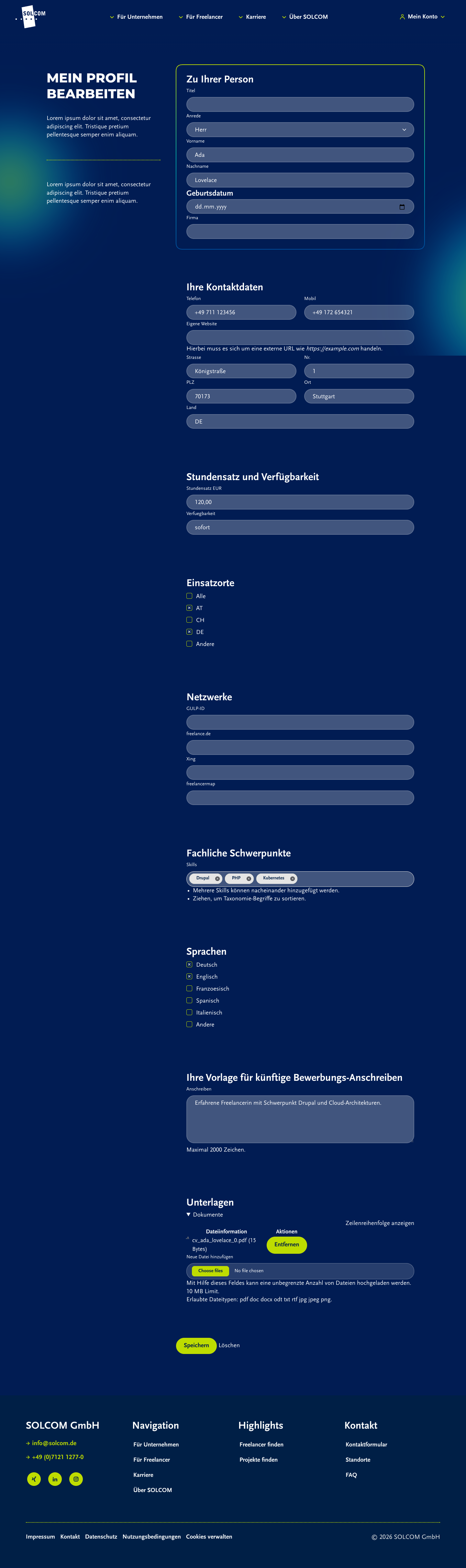
| Profil bearbeiten | Profile Entity Form | Teilmatch .profile-flexrow matcht Desktop row und Mobile column; Labels/Inputs/Fieldsets matchen. |
P1 Dateiupload ist Entity-Tabelle, nicht Webform-Dropzone. Geburtsdatum rendert als H4. Formbreite 768px statt Apply-900px. |
Desktop, Mobile |
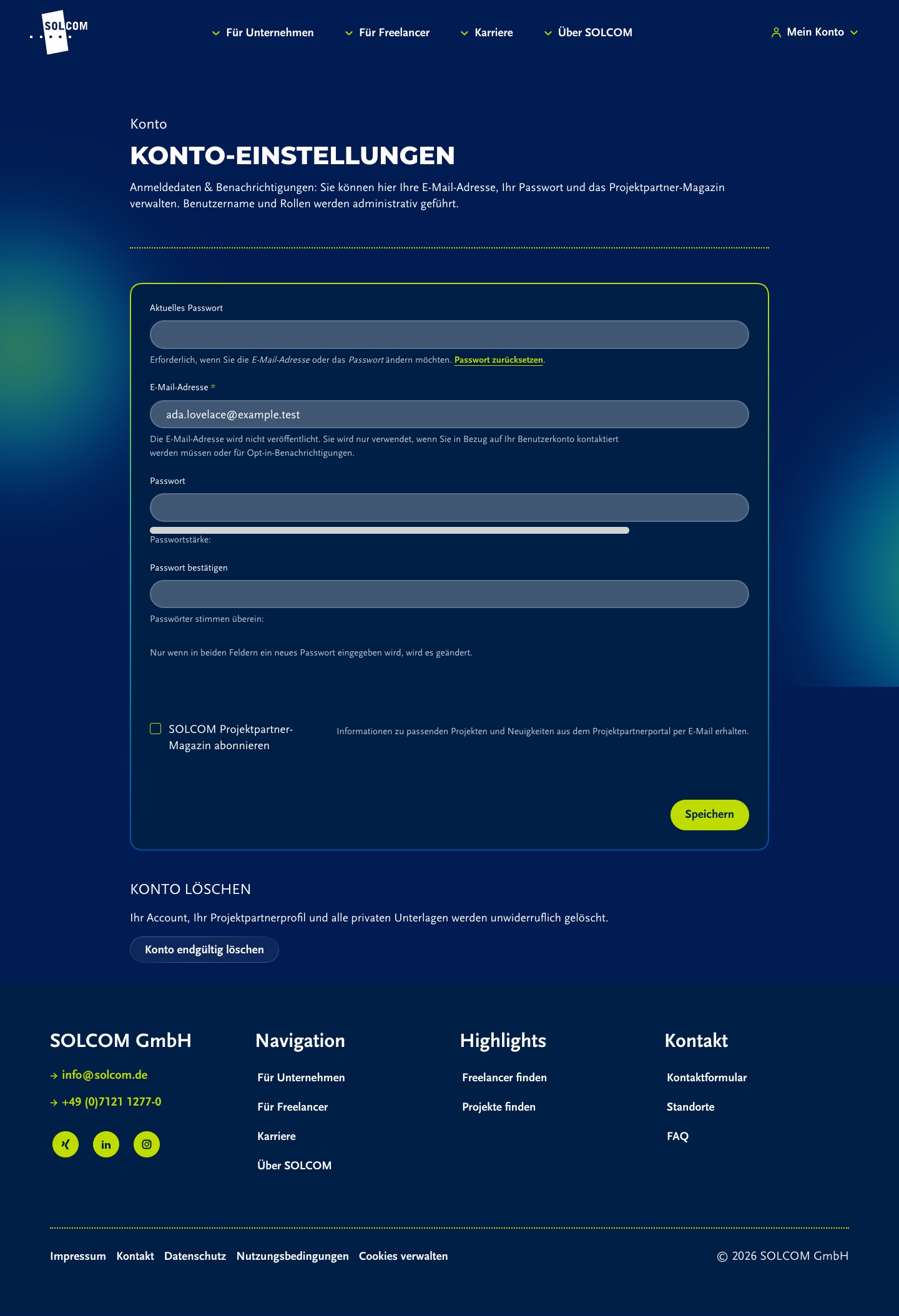
| Konto-Einstellungen | Core User Entity Form im Custom Wrapper | Basis Inputs, Labels, Checkbox, Submit bekommen Basis-Styles. | P1 Keine Fieldsets/Section-H3, kein Webform-/Profile-Flexgrid. 960px Desktop-Form, eigene Informationsarchitektur. | Desktop, Mobile |






3. Konkrete Findings
P0: Projektbewerbung hat doppelte H1
Browser-Snapshot zeigt zweimal
Auf Projekt bewerben. Ursache ist Zusammenspiel aus Route/Page-Title und Custom
Template-Heading. Das bricht die klare Webform-Hierarchie und ist visuell wie semantisch driftig.
P0: Projekt-Alert und Suchagent sind nur token-paritaetisch
Beide Custom-Forms nutzen
.projektpartner-alert-form und bekommen korrekte Farben, Typografie und Buttons.
Sie nutzen aber keine webform_flexbox-Rows. Kontaktfelder und Kriterien bleiben auf Desktop einspaltig,
waehrend Referenz-Webforms ab lg zweispaltig werden.
P0: Canvas- und Direct-Route Projekt-Alert divergieren
/projektportal/projektalert misst 768px Formbreite; /projektportal/projekt-alert/abonnieren
misst 900px. Zusaetzlich unterscheiden sich H1-Texte. Wenn beide URLs erreichbar bleiben, muss eine URL kanonisch sein.
P1: Profil-Dateiupload ist kein Webform-Upload
Profilbearbeitung nutzt Entity-File-Tabelle mit Reorder/Remove, nicht
webform_document_file oder Webform-Dropzone.
Mobile kein Overflow, aber visuell anderer Upload-Contract.
P1: Konto-Einstellungen fallen aus Section-System heraus
Account-Form bekommt Input-/Button-Tokens, aber keine Fieldsets/Section-H3 und kein Grid. Fuer 1:1 Webform-Paritaet fehlt
ein expliziter Formular-Skeleton-Wrapper.
P1: Registrierung ist Webform, aber zu breit fuer Apply-Referenz
Desktop-Registration misst 1248px, Vacancy-Referenz 900px. Das kann bewusst Wizard-bedingt sein, muss aber entschieden
werden, wenn alle Portal-Formulare gleich wirken sollen.
4. Screenshot-Matrix
Referenzen


Projektportal

5. Empfohlene Pruefschritte
| Prioritaet | Pruefschritt | Akzeptanz |
|---|---|---|
| P0 | Projektbewerbung H1 bereinigen und Browser-Screenshot neu erfassen. | Genau eine H1; Webform-Fieldsets bleiben H3/Legend; keine doppelte sichtbare Seitenueberschrift. |
| P0 | Projekt-Alert/Suchagent Custom-Forms auf Webform-Skeleton mappen. | Desktop-Kontakt-/Kriteriengruppen nutzen denselben Row/Gap-Contract wie webform_flexbox oder bewusst dokumentierten Ersatz. |
| P0 | Projekt-Alert Canonical entscheiden. | Canvas und Direct Route zeigen gleiche H1, gleiche Breite oder Direct Route redirectet/ist intern. |
| P1 | Profil-Dateiupload an Webform-Upload angleichen oder Ersatzvertrag dokumentieren. | Upload sieht nicht wie Admin-Entity-Tabelle aus oder ist als bewusst anderer Profil-Contract dokumentiert. |
| P1 | Konto-Einstellungen mit Formular-Skeleton versehen. | Fieldsets/Sections, Formbreite und Abstand folgen Portal-Webform-Contract. |
| P1 | Registration-Containerbreite entscheiden. | Wizard ist bewusst breiter oder auf Apply-Referenzbreite normalisiert. |
| P2 | Visuelle Regression als Screenshot-Set versionieren. | Desktop/Mobile Screenshots fuer Webform-Referenz, Projektbewerbung, Alert, Suchagent, Profil, Konto sind Teil der QA-Checkliste. |
6. Quellen und Evidence
web/themes/custom/byte_theme/src/form.css: zentraler Formular-Contract.config/sync/webform.webform.beispiel.yml: staerkste visuelle Webform-Referenz.config/sync/webform.webform.vacancy_application.yml: Apply-Webform-Referenz.config/sync/webform.webform.rsm_project_offer_application.yml: Projektbewerbungs-Webform.config/sync/webform.webform.projektpartner_registration.yml: Projektpartner-Registrierungs-Wizard.web/modules/custom/solcom_project_offer/modules/solcom_project_offer_alert/src/Form/ProjectOfferAlertSubscribeForm.php: Public Projekt-Alert Custom Form.web/modules/custom/solcom_projektpartner_alert/src/Form/PppAlertForm.php: eingeloggter Suchagent.web/modules/custom/solcom_projektpartner/src/Plugin/Block/ProjektpartnerProfileEditBlock.php: Profil-Entity-Form in Canvas.web/modules/custom/solcom_project_offer/templates/solcom-project-offer-application-page.html.twig: Projektbewerbungs-Wrapper.
Arbeitsstand. Es wurden keine Code-Aenderungen vorgenommen. DDEV-Cache wurde einmal mit
ddev drush cr neu aufgebaut, weil die Project-Offer-Apply-Route vor Cache-Rebuild im Browser 404
lieferte. Dabei trat eine bestehende ECA-Deprecation-Warnung auf; Cache-Rebuild endete erfolgreich.